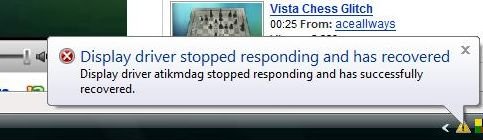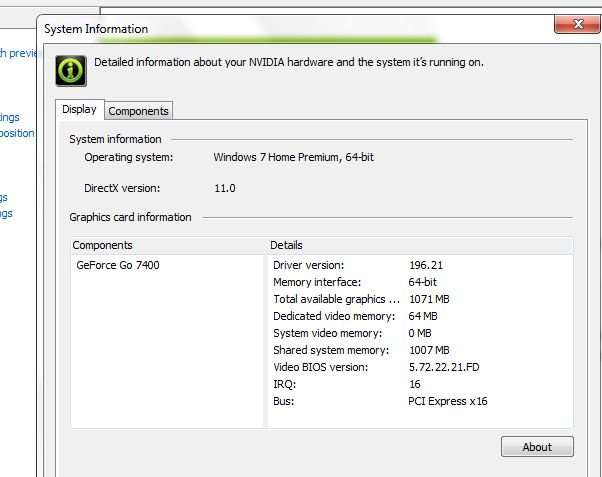
XPS m1210 7400go Windows 7 64 bit driver issue fix
After some hours of running normaly it would stop responding and the computer wud freeze take a minute and recover back. This made the whole machine sluggish and I needed to restart again and again. I simply hate restarting my computer. There have been times when it kept running for more than two weeks at a stretch.
To resolve the driver stopped responding issue I googled some and came to know on Nvidia forum that many other also face the same issue on Geforce go 7400 and several others face similar issue with a variety of cards just because of the drivers lacking full support for windows 7 64 bit.
Here is a fix for the Geforce go 7400.
Download the drivers version 196.21 from laptopvideo2go.com
Download both the driver and modified inf file.
Extract the driver to a comfortable location.
Copy the downloaded nv_disp.inf and replace it with the one found in the folder where you extracted the driver .
Move the downloaded nv_disp.inf (176K) file into the 196.21_win7×64 folder to replace the older nv_disp.inf file in that folder. – as suggested by Kate
First uninstall the installed driver
Run the setup.exe and you would be prompted to install or abort as this is not WHQL certified driver.It might happen that the driver takes longer than normal to install. Be patient and let it finish.
Restart when the setup asks you to.
And you are done. Enjoy
After installing the new patched driver from laptopvideo2go there has beena significant improvement in the performance and response of my XPS m1210 aka Minimachine. Also the directx version displayed by the driver changed from 10 to 11. This is a must fix for all XPS m1210 owners with windows 7 64 bit.
More from MtaraM
- Generic host win32 error revisited
- My XPS m1210 and Windows 7 64bit
- Microsoft Windows 7 scam
- XPS 1210 camera hack.
- Windows 7 64 bit demystified


Social comments and analytics for this post…
This post was mentioned on Twitter by mtaram: XPS #m1210 7400go #Windows7 64 bit driver issue #fix – http://bit.ly/dl4Qmw...
I found this site/blog, from a forum, from a link listed in the results of searching for a solution to this, blog entry, problem. It’s been 3 days but I think it’s the right time to say…. THANK YOU! If you didn’t post this up, the shortcut to this wonderful solution, I would keep getting the blue screen of death. Thank you thank you thank you!
You are always welcome
I am happy to know that it helped you.
Pure GENIUS! I’ve been struggling with this all day. Fortunate to find your site and now I’m running.
The GeForce 7400 (mobile) would not install from nVidia. It claimed I wasn’t running the right hardware. But your fix did the trick.
THANKS!
You are welcome my friend…. It feels great to be of help to some one… This issue bugged me for so long that I was hell bent on finding a fix… n once I did I posted for all…
Hi,
Is it possible to upgrade the geforce go 7400 chip? I dont mean update a driver but actually upgrade the hardware to a newer chip.
I too have considered that option… but the major issue is that the 7400 chip is soldered onto the motherboard and the pin layout of the other GPU will not be the same…
would need some exteme hacking and might toast the XPS
Fantastic. I used this driver setup and new .inf for my Sony VGN-FE890 and now things are back to normal. One step should be clarified in the above instructions. “Copy the downloaded nv_disp.inf and replace it with the one found in the folder where you extracted the driver” should be changed to “Move the downloaded nv_disp.inf (176K) file into the 196.21_win7x64 folder to replace the older nv_disp.inf file in that folder.”
Also, when uninstalling the driver, there is a restart and the W 7 then reinstalls a generic driver. However, don’t be compelled to then try to uninstall THAT generic driver…it doesn’t cause any issues when running the Nvidia setup.exe.
THANKS, UTKARSH!!
Thanks a lot for the information. I have added the line u suggested for added clarity.
this is great! my mine works like a charm
I’m having problems with the driver website you link to. I also have a M1210 same 7400 but running Win7 32-bit. Would you be able to link the proper driver / mod inf for that?
Thanks!